Problem with Firefox

WillowTheWhisp

Resident Waffler
Overlooker
Since closing and restarting my PC today I have discovered a weird thing when I opened up Firefox. I have a blank chunk across the bottom with a little ^ in it. This is making my web pages shorter than usual. Anybody know how it has occurred and how I can get rid of it? I have tried closing off Firefox and re-opening it but that makes no difference. It's still there. See image
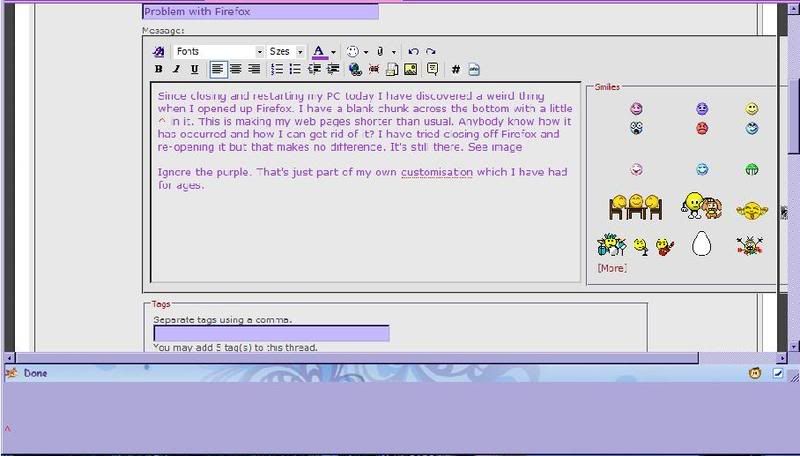
firefoxthingy.jpg


Ignore the purple. That's just part of my own customisation which I have had for ages.
 
Golly gosh. I even responded in that thread but had forgotten all about it. Do you reckon it might work if I upgrade? I don't want to lose my bookmarks as I have millions of them!
 
Save your profile folder, even saves your passwords and log in details
 
Last edited:
dont know bugger all about em willow, but didn't lose mine when i re-installed etc, only lost em when i changed computers in jan this year.:)
 
Firefox won't even flippin well open this morning. I am currently using Opera. I much prefer Ff though and will have a do at getting it back later on today. Several other things to sort out first. Emzy will have an idea what a few of them are!!:D
 
the "chunk " at the bottom of the screen looks like you toolbar has been extended- if you run your mouse over the top edge you should see a double ended arrow once you see that click and pull down the edge of your toolbar to a normal size
hope it helps x
 
Tried that Keetah but it won't. I think that the ^ is something to do with why not. It looks like some sort of bit of coding stuck in there. Not that I can even get on Firefox at all at the moment to do anything though! :mad: (that emoticon is directed at Ff not you)
 
looks like a config file is corrupt and that is causing teh issue, have you tried renaming/moving your firefox profile out of its default location and then starting it up? this should force it to create a new blank profile, then you can copy teh fav's etc back in.

Re millions of bookmarks, its worth doing an export to an HTML page and storing that file on a webspace somewhere. that way you are secure against PC breakdown etc.
 
Well I finally managed to get Ff to speak to me and upgrade to the latest one which means I have lost my fancy squiggles and wiggles as they are no longer compatible but at least I've also lost that blessed ^ and the huge gap at the bottom!

Re millions of bookmarks, its worth doing an export to an HTML page and storing that file on a webspace somewhere. that way you are secure against PC breakdown etc.

Hmmm :D I ought to tidy up a lot of things. I know I should. You should see the state of my desktop for a start off! I keep meaning to get around to it and probably will do eventually. Saving some stuff I don't want to risk losing would be a good starting point. Anyway so far so good. I have my favourites and I have a working browser without a bit gap in its bottom.

Now to do a bit of sewing. :D
 
Thanks Ken. I'll attempt to make sense of that as soon as my brain starts working - kids TV shows blaring in my ear do not help the concentration here.
 
Back
Top